> For the complete documentation index, see [llms.txt](https://documentation.virbox.com/llms.txt). Markdown versions of documentation pages are available by appending `.md` to page URLs; this page is available as [Markdown](https://documentation.virbox.com/protect-static-library-and-object-file/protect-static-libraries-and-object-file.md).
# Protect Static libraries and object file
Developer use Virbox Protector to protect object file, static library with the most secure way.
## Overview of Static Libraries and Object Files
Object files are intermediate outputs generated after source code compilation. Object files contain assembly or machine instructions, symbol tables, and other metadata required during the linking stage. On Linux systems, object files typically use the `.o` extension, while on Windows they use `.obj`.
Static library files are collections of precompiled object files packaged together for reuse during the linking process. When a program is compiled and linked, the required object files inside the static library are copied into the final executable. Static libraries usually use the `.a` extension on Linux and `.lib` on Windows.
#### Security Concerns
Although object files are compiled binaries, they still contain assembly instructions and symbol information. With reverse‑engineering tools, attackers can analyze these files and reconstruct C‑style pseudocode.
In scenarios where developers only deliver static libraries or object files to customers, protecting these project becomes critical to prevent reverse engineering and intellectual property theft.
Virbox Protector secure static libraries and object files through **symbol/name obfuscation** and **function‑level protection**, including **code obfuscation** and **code virtualization**.
### Using Virbox Protector to protect Static Libraries and Object Files
#### Advantage
1. Protected programs generally do not affect the runtime loading speed or memory consumption when linking libraries during compilation.
2. Protected programs typically encounter no compatibility issues at compile time.
3. When appropriate protection methods are applied to functions, program startup time and memory usage remain largely unaffected.
#### Performance Impact
The performance impact of protecting static libraries and object files mainly comes from **function-level code obfuscation and virtualization**.
* Virtualization introduces the highest overhead, while obfuscation is lighter.
* The actual performance loss depends on the specific code logic.
Examples:
1. For functions with frequent loop calls, applying virtualization and obfuscation can noticeably affect runtime performance.
2. For functions with simple logical operations, full virtualization may have minimal impact.
**Recommendation:** Protect only core code, focusing on workflows and logical operations. Avoid applying protection to large loops or enabling protection for all functions indiscriminately.
#### Supported Architectures
Static libraries and object files are supported on the following systems:
| System | Support Status |
| --------------------------- | -------------- |
| Windows (x86 and x64) | Supported |
| Linux (x86 and x64) | Supported |
| Arm Linux (arm32 and arm64) | Supported |
| macOS (x64 and arm64) | Supported |
### Protection Process
when you install Virbox Protector trial or commercial installation package, you can find Virbox Protector GUI tools and CLI tools in the sub-directory of `\bin` in your specified installation folder:
#### Virbox Protector GUI tools
`virboxprotector.exe`
#### Virbox Protector CLI tools:
`virboxprotector_con.exe`
We use `Virbox Protector` GUI tools to show you the protection process to protect Static Libraries and Object Files.
Double click `Virbox Protector` GUI tool icon in your windows UI or entry the `\bin` and find the Virbox Protector GUI tool and start it.
1. Import your object file or static library into Virbox Protector GUI tool
2. Select & Set "protection" option to those critical "Functions" in "Function Option" Tab
3. Set "name of obfuscation, Watermark & Merge Object file" in "Protection Option" Tab
4. Click File menu to start "Protection" process.
5. find the protected file in output path.
6. Use the protected file to archiving with .a file or link to generate elf file.
#### Prerequisites
sign up in Virbox Protector and contact Virbox team to get the license
Open Virbox Protector GUI tools,
1. Import your object file or static library into Virbox Protector GUI tool
Drag the object file or static library which you want to protect into Virbox Protector GUI tools, then Virbox Protector will parse the file:
For .a file, the parsing info show as in below:
For Object file, the parsing info show as in below
2. Select & Set "protection" option to protect those critical "Functions" in `Function Option` Tab
> Virbox Protector provides multiple fine grained protection option to protect specified function/core algorithm in the .a or object file.
Go to `Function Option` tab, click `add` button to select those critical function which need to protect.
There are two type of "protection" option can be set to protect those functions by click drop down arrow on the `Protection Type` of selected function:
* Obfuscation
* Virtualization
Click `OK` to complete setting.
> Tips: Its recommend to protect only those functions which is critical (to keep execution performance);
3. Set `name of obfuscation`, `Watermark` & `Merge Object file` in `Protection Option` Tab
Virbox protector support developer to set:
Name of Obfuscation
Merge Object file
Watermark
in `Protection Option` tab.
Developer also select and set the output path in “Protection Option"
4. Click File menu to start "Protection" process
5. Go to output path find the protect .a file or .o file.
6. then use the protected file to continue your development process. archiving or link to generate a output file (elf file or HEX file).
> with protection by use of Virbox Protector, it will not change your workflow.
For better use `Virbox Protector` to protect static library and object file, we introduce protection functionality in next Chapter.
### Protection Functionality Overview
#### Basic Functionality (Set Protection Option)
**Symbol/Name Obfuscation**
You can use `linux` command `nm ` to inspect program symbols. The printed output includes identifiers with the following meanings:
* **r**: Read‑only data symbol.
* **b**: BSS segment symbol, typically representing uninitialized global variables.
* **t / T**: Text segment symbol, containing executable code.
* **U**: Undefined symbol, which must be resolved during linking.
* **W**: Weak symbol, allowing multiple symbols to share the same name.
**Note:** Undefined symbols (**U**) and weak symbols (**W**) are not obfuscated by default.
**Local Symbol Obfuscation**
Static libraries and object files both contain local symbols. Local symbols typically describe function names and address information, which are used by the linker to resolve symbol references when building the executable.
When applying protection, you can choose to obfuscate only local symbols. This option ensures that local symbols are obfuscated while maintaining overall compatibility and functionality.
**Comparison (After Local Symbol obfuscation & without Obfuscation)** The following illustration demonstrates the impact of local symbol obfuscation:
> The left diagram shows the result of **local symbol obfuscation**, while the right diagram displays the **original program** without obfuscation.
**Preserving Custom Symbols**
(`Keep Custom Names` in GUI tool)
Static libraries and object files often contain custom symbols, which are defined within a file but accessible from other files. These may include both global and static symbols, typically specified using certain keywords or modifiers to define their attributes and scope.
**Notes:**
1. If the option *Preserve Custom Symbols* (`Keep Custom Name`) is selected but the name list is empty, all symbol names will be obfuscated by default.
2. Ensure that exported function names are retained as needed; otherwise, compilation and linking will **fail** with errors indicating unresolved symbols.
**Comparison (Preserve Custom Symbols & without Preserve Custom Symbols)** The following diagram shows the impact of preserving custom symbols:
> The left diagram shows the result of Preserving Custom Symbols, while the right diagram displays the **original program**
**Merging Object Files**
Protect Static libraries, Virbox Protector support the functionality of merging object files.
**Description:** Since a static library is composed of multiple precompiled object files, enabling the *Merge Object Files* option consolidates all `.o` or `.obj` files inside the library into a single `.o` or `.obj`.
**Purpose:** When a static library contains multiple `.o` or `.obj` files with interdependent symbol references, applying name obfuscation may cause symbol resolution issues during program loading. By merging object files, such problems can be avoided.
**Comparison (After Merging Object file & Before Merging object file)** The following diagram shows the impact of merging object files: (Insert diagram or screenshot here)
> The left diagram shows the result of Merging Object Files, while the right diagram displays the **original program.**
Protect specified "function" (Setting in "Function Option")
Virbox Protector support developer to protect specific functions with "Obfuscation", "Virtualization", to defend static analysis tool to reverse.
**Code Obfuscation**
Code obfuscation transforms the original instructions within a function into randomized, unreadable fragments through techniques such as:
* Equivalent instruction substitution
* Immediate value encryption
* Indirect jumps
* Fake branches
* Dummy instructions
* Instruction slicing
These methods convert the original instructions into complex, non‑readable sequences, making reverse engineering significantly more difficult.
**Decompiled original Program:**
**Decompiled after Obfuscation:**
**Code Virtualization**
Code virtualization transforms the original assembly instructions within a function into a set of custom virtual instructions. At runtime, these virtual instructions are executed inside a custom **Virtual Machine**, which simulates behaviors such as memory access, conditional branching, and register state transitions.
**Decompiled Original Program (without Virtualization):**
**Decompiled after Virtualization:**
#### Automated Integration
Automated integration allows you to protect files through command‑line operations. Virbox Protector supports a full set of command‑line options, enabling you to specify both basic protection settings (Function Option Setting) and function‑level configurations (Protection Option setting)—making it suitable for CI/CD pipelines and other automated workflows.
For more details, see [Virbox protector Command line tools](https://documentation.virbox.com/fundamentals/cli-tool-overview)
**Find Virbox Protector Command-Line Tool**
The command-line tool `virboxprotector_con` is installed in the following default paths:
* **Windows:** `C:\Program Files\senseshield\Virbox Protector 3\bin`
* **Linux:** `/usr/share/virboxprotector/bin`
* **macOS:** `/Applications/Virbox Protector 3.app/Contents/MacOS/bin`
**Protecting Object Files**
Run the following command to view all available parameters for object file protection:
`virboxprotector_con --help=obj`
**Protecting Static Libraries**
Run the following command to view all available parameters for static library protection:
`virboxprotector_con --help=archive`
**Merge Only (Without Applying Protection)**
This option performs **object-file merging only**
Run the following command to view all available parameters for object file protection:
`virboxprotector_con --help=objmerge`
Run the following command to merge object-file
```
virboxprotector_con -objmerge ... [-o ]
virboxprotector_con -objmerge lib1.a lib2.a lib3.a -o libtest.a
```
#### Protection Options
The following table lists the available protection options, their corresponding command‑line parameters, and wildcard support:
| **Option** | **Command-Line Parameter** | **Wildcard Support** |
| ------------------------------------------ | -------------------------- | -------------------- |
| Name Obfuscation | `--rename=` | 0 |
| Function Name List | `--keep-rules=` | 2 |
| Function Name List File path | `--keep-file=` | N/A |
| Merge Object Files (static libraries only) | `--obj-merge=` | 0 |
**Name Obfuscation Options**
The `--rename` parameter controls how symbol names are obfuscated:
* **--rename=0** — Disable name obfuscation.
* **--rename=1** — Obfuscate **only local symbols**.
* **--rename=2** — Preserve custom symbol names (`Keep Custom name` shown in GUI tools) while obfuscating others.
**Example Commands**
1. Protect a static library, enable object-file merging, and obfuscate only local symbols:
```
virboxprotector_con libhello.a --obj-merge=1 --rename=1 -o protected/libhello.a
```
2. Protect a static library, enable object-file merging, and preserve custom symbol (`Keep Custom Name`) names:
```
virboxprotector_con libhello.a --obj-merge=1 --rename=2 --keep-rules="main;array" -o protected/libhello.a
```
3. Using a File to Preserve Function Names (`Keep Custom Name`)
If the list of function names to preserve is too long, you can store the names in a text file (for example, `symbol.txt`) and specify it using the `--keep-file=symbol.txt` option when running the command-line tool.
Run following command:
{% code overflow="wrap" %}
```
virboxprotector_con libhello.a --obj-merge=1 --rename=2 --keep-file=symbol.txt -o protected/libhello.a
```
{% endcode %}
#### Function Option
You can specify function names or matching rules to apply protection. Multiple entries are separated using semicolons (`;`), and wildcard `*` is supported.
| **Option** | **Command-Line Parameter** | **Wildcard Support** |
| ---------------------------- | ------------------------------ | -------------------- |
| Ignore Unsupported Functions | `--ignore-unsupported=` | N/A |
| Code Obfuscation | `-m` | Supported (`*`) |
| Code Virtualization | `-v` | Supported (`*`) |
**Examples**
```
-m "function1;function2" -v "function3;function4" -e "test*" --ignore-unsupported=1
```
`--ignore-unsupported=`
**Ignore Unsupported Functions**
The `--ignore-unsupported` option is used to skip functions that are not supported by the protection engine. If a function cannot be processed, it will simply be ignored rather than causing the protection process to fail.
This option is **enabled by default** for programs in the following formats:
* Jar
* AAR
* WAR
* APK
* AAB
Command line Example: Apply Function Virtualization with Object-File Merging
Protect a static library, apply **function virtualization**, enable **object-file merging**, and obfuscate **only local symbols**:
```
virboxprotector_con libhello.a -v "main;array" --obj-merge=1 --rename=1 -o protected/libhello.a
```
### Best Practice to Protect objective file/Static lib
#### Protection Option
**Name Obfuscation**
**Protect a Linux x64 static library and object file:**
1\) Select the **Preserve Custom Symbols** (`Keep Custom Names` in the GUI tools) option while leaving the name list empty, then apply protection to the selected items.
2\) When linking the protected object files with the compiler, an error occurs: **"undefined reference to xxx"**
3\) Based on the symbol names reported in the linker error, add the required names (for example, `main`) to the custom symbol list, then apply protection again.
4\) After updating the custom symbol list and re‑protecting the selected items, the compiler can successfully link the object files without errors.
**Protect a Windows x64 static library and object file:**
1\) Select the **Preserve Custom Symbols** option (`Keep Custom Names` in GUI tools setting) while leaving the name list empty, then apply protection to the selected items.
2\) When linking the protected object files with the compiler, an error occurs: **"undefined reference to xxx"**
symbol names reported in the linker error, add the required names to the custom symbol list — for example: `someLibFunc`, `feiboLib`, `arrayLib`. After updating the list, apply protection to the selected items again.
4. After updating the custom symbol list and re‑protecting the selected items, the compiler can successfully link the object files without errors.
### FAQ
#### Unrecognized OBJ Files
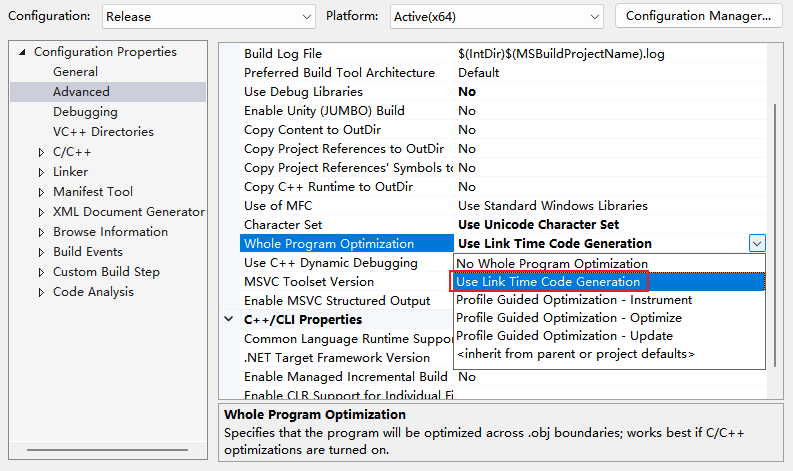
When compiling a Release-version `.lib` using Visual Studio, the protection tool reports **"File format error"** during parsing. How should this be resolved?
1. In the project settings, navigate to **Configuration Properties → C/C++ → Optimization**, and modify the **Whole Program Optimization** setting. The option **"Use Link-Time Code Generation"** is not supported. Change it to another optimization mode, as shown in the example below.
2. In the project settings, navigate to **Configuration Properties → C/C++ → Optimization**, and set **Whole Program Optimization** to **No**, as shown in the example.
3. After adjusting the settings, save the configuration and recompile the project. The newly generated `.lib` file can then be correctly recognized by the protection tool.